Iron Lizard Games
A GameMaker Audio System for a Tactics Game
How we built Mokgard's GameMaker audio system on Vinyl: 139 sound events, voice priority, virtual emitters for 29 lamps, bar-synced music and the pitfalls.
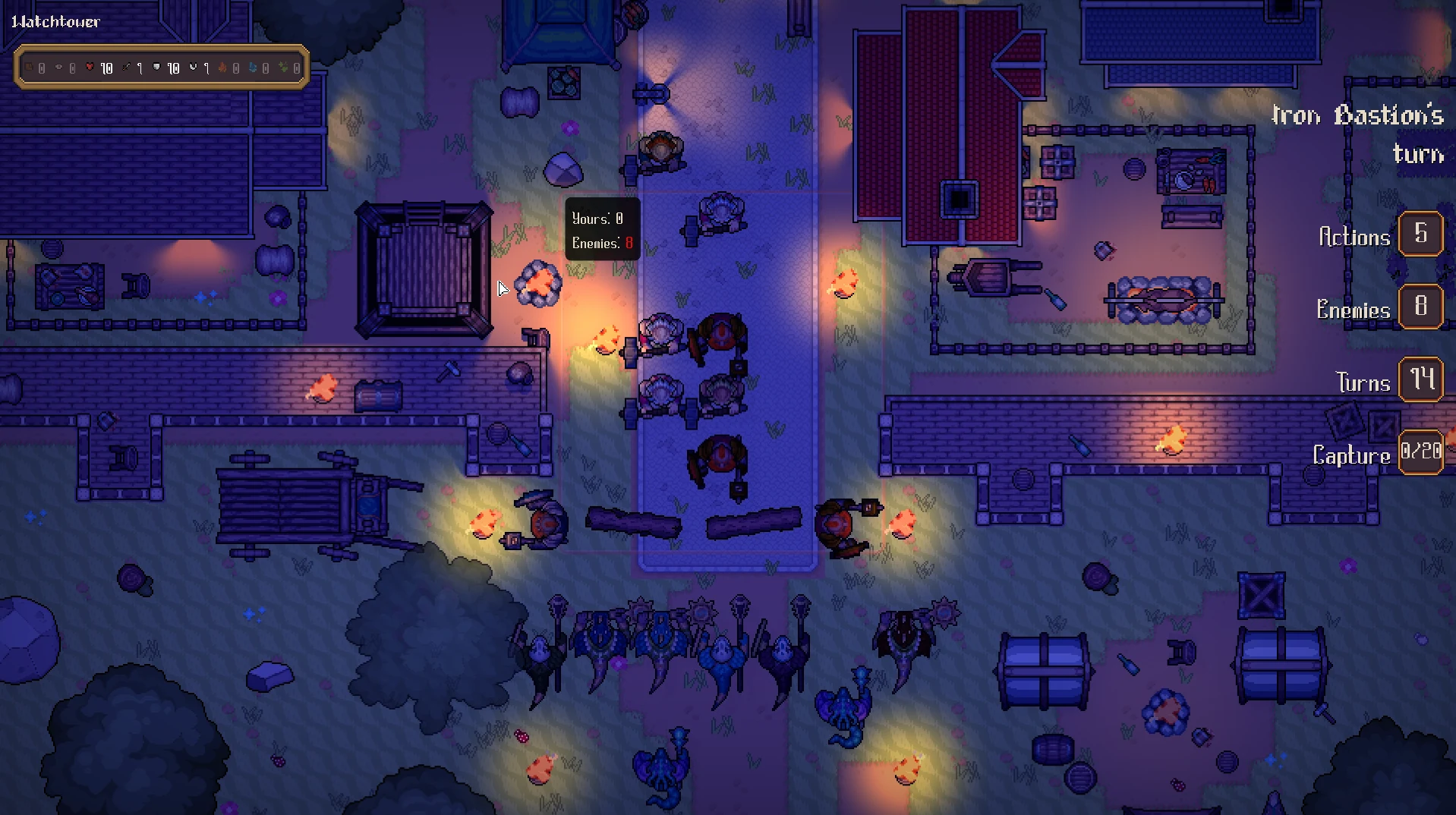
A night battle in Mokgard can have dozens of torches and lamps, a river, rain, two armies and a music track, all on screen at once. Hooking audio_play_sound into each of those gives you noise, dropped sounds and, in our case, dropped frames.
This post walks through the GameMaker audio system we built for Mokgard in a week of focused work: a data-driven event list, five mixes with priorities, positional "virtual" emitters, music that changes on the bar, and the pitfalls we hit along the way. It sits on top of Vinyl, Juju Adams' open-source audio library for GameMaker, but most of the patterns apply to any GameMaker project.
Mokgard and why audio got its own system
Mokgard: The War of the Oath is a turn-based tactics game in pixel art, written in GameMaker (GML). It has a hex campaign map, grid battles and a camp, plus light, weather and day/night that change the battlefield. Until this month, the game was almost silent.
A tactics game is audio-dense in bursts. An explosion hits five units in the same frame, the AI deploys its whole army at once, and every map, from the forests to the harbors of Mokgard's regions, is full of things that hum, crackle or flow. We wanted all of that to sound like a mix instead of a pile of sounds playing on top of each other. Our design notes put it this way: good sound comes from mixing, variation and sync more than from the quality of any single file.
A night map in Mokgard. Every torch and lamp here is a looping sound source. The emitter system below was built for maps like this one.
GameMaker audio system architecture: events, not sound assets
The game code never names a sound file. It calls our audio wrapper with the name of an event:
Audio.play("ui_click");
Audio.play_at("melee_hit_flesh", _target.x, _target.y);
var _voice = Audio.loop("cart_move", x, y);
An event like melee_hit_flesh is a Vinyl pattern. Which clips it plays, with what gain and pitch range, lives in a JSON file (vinyl.json) that the game imports at startup. Three properties make this work in practice:
- A missing event just plays nothing.
playchecksVinylPatternExistsfirst, because playing an unknown pattern in Vinyl raises an error. We hooked events into the code before most of them had a sound, and filled them in later from our editing tool (next section) without touching GML. - Variation lives in data. A frequent event gets several clips in shuffle mode (our target is 3–5) plus a small random pitch and gain range, so ten arrow hits don't sound like one sample on repeat.
- Hot reload in development. Every 60 frames, the game hashes the project's
vinyl.jsonand reimports it when the file changes. Gain, pitch and clip assignments update while the game runs. Only a brand-new sound asset needs a recompile.
The Audio Mapper: a local tool as the source of truth
vinyl.json isn't written by hand. It is exported by Audio Mapper, a small local web tool (a Bun server plus one HTML page) that holds the full sound design in sound_events.json: 139 events, each with a category, a mix, a kind (one-shot, loop, music, ambience), whether it is positional, a priority, and the exact code location where it fires.
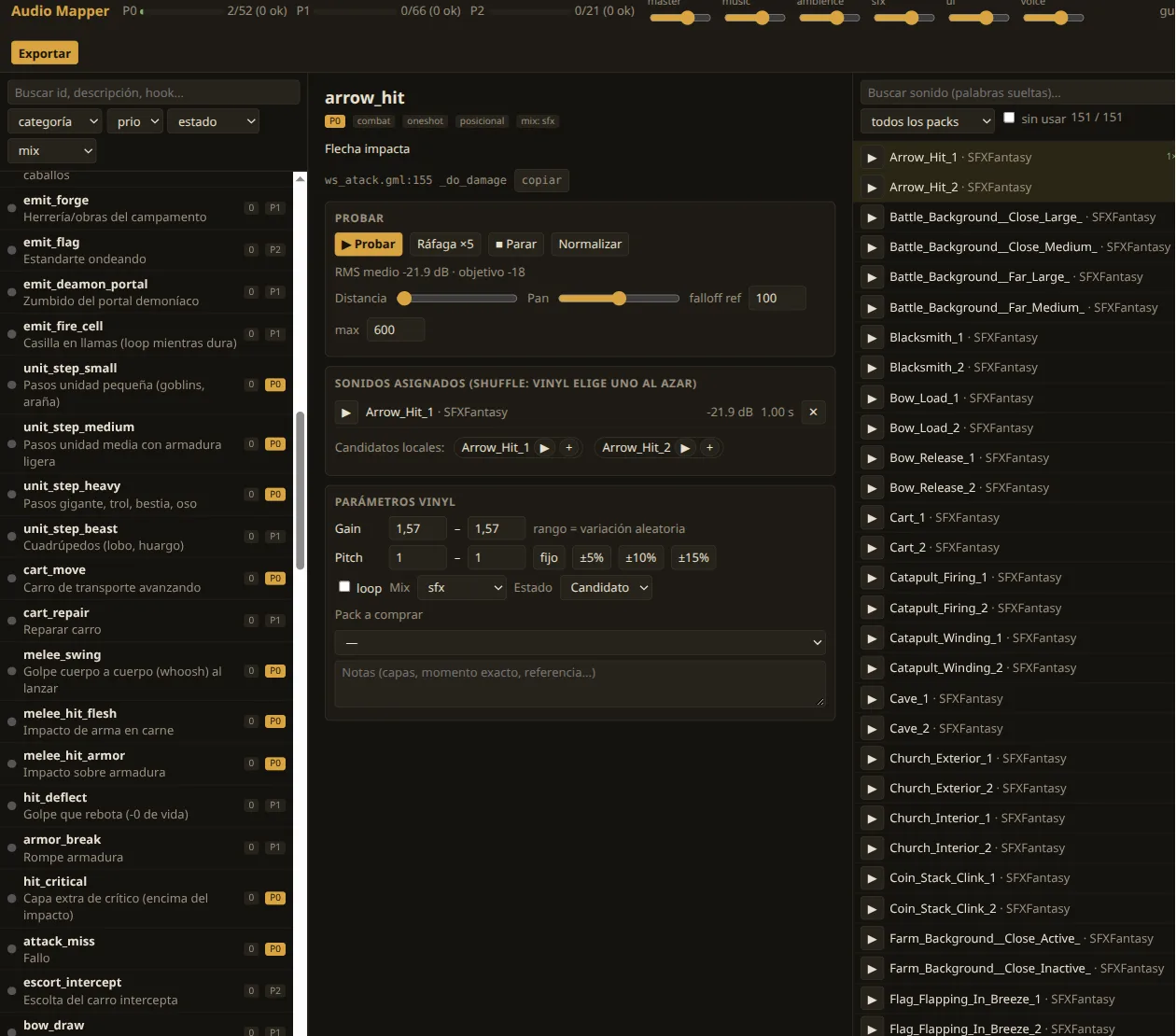 Audio Mapper, our internal tool (Spanish UI). The middle column edits one event: preview it, burst it five times to hear repetition, and set Vinyl's gain and pitch ranges.
From the tool you can audition candidates from every installed sound pack, play an event five times in a row to hear repetition, normalize loudness against a target per mix, and preview distance and pan for positional sounds. Export writes vinyl.json and an import manifest. An import script then converts each clip to OGG and creates the matching sound asset in the GameMaker project from the command line, with the right compression and channel settings.
The game also talks back. The in-game audio debug panel shows every playing voice by mix, with gain, distance and pitch. Moving a slider there edits the live pattern, and Save sends the values to the tool's server, which writes them into both JSON files. So most of the mixing gets done with the game running.
Five mixes and a voice budget
Every event belongs to one of five mixes: music, ui, voice, sfx and ambience. Each mix has its own volume slider in the settings menu, and each one controls two things that Vinyl doesn't handle on its own.
Priority per mix
GameMaker has a limited number of audio channels. When they are full, it drops lower-priority sounds to make room for higher-priority ones (see priority in the GameMaker manual for audio_play_sound_at). We assign priority by mix:
| Mix | Priority | Voice cap |
|---|---|---|
| music | 100 | (one track) |
| ui | 90 | 3 |
| voice | 70 | 2 |
| sfx | 50 | 4 |
| ambience | 20 | 3 |
With full channels, GameMaker now drops a torch before a victory stinger. At first it didn't, because Vinyl launched every sound at priority 0. We patched four of its internal classes to call our priority function, and we marked each patch with the same comment tag so a text search finds all of them when we update the library.
Voice caps and cooldowns
When a one-shot goes over its mix's voice cap, the oldest copy fades out in 50 ms to make room. On top of that, each pattern has a 50 ms cooldown, so the five impacts of one explosion produce one sound instead of five stacked copies that clip.
Positional audio and virtual emitters
The listener sits at the center of the camera, raised above the map by 0.35 × the view width. When the player zooms out, the camera effectively rises, and everything sounds farther away and less panned. We didn't have to write any zoom-specific audio code to get that.
Falloff is in world pixels and differs by use:
- One-shots (
play_at): full volume up to 160 px, silent from 1,400 px. - Fixed emitters (campfires, torches, rivers, waves): 80 px to 700 px. They are background, so they are only audible up close.
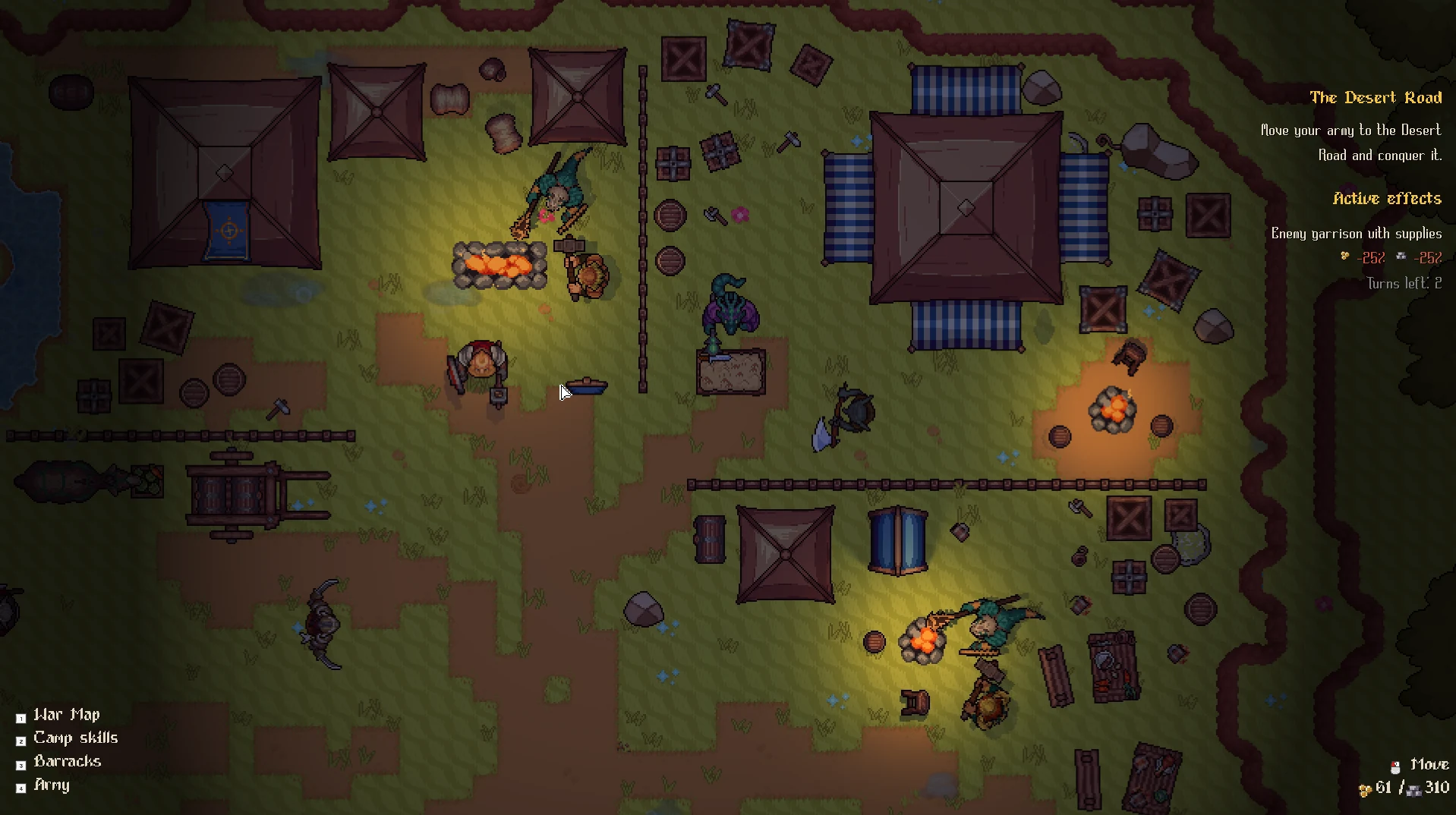 The camp. Campfires are positional loops, and units walking around play footstep loops that follow them.
Why emitters need to be "virtual"
A loop for every torch on the map is easy to write and expensive to run. Our emitters are virtual: the emitter() call returns a handle, not a playing voice, and every 15 frames a step function decides which handles actually play:
// Every 15 frames: only the 4 closest in-range emitters per event play.
for (var i = 0; i < array_length(_emitters); i++) {
    var _h = _emitters[i];
    // A playing emitter gets a 150 px head start, so two torches at the
    // same distance don't swap back and forth every check.
    var _margin = is_undefined(_h.voice) ? 0 : EMITTER_HYSTERESIS;
    var _d = point_distance_3d(_h.x, _h.y, 0, _listener.x, _listener.y, _listener.z);
    if (_d >= EMITTER_FALLOFF_MAX + _margin) { _emitter_stop(_h); continue; }
    _h.rank = _d - _margin;
    // ...group by event, sort by rank, start the first 4, stop the rest
}
Three details make it sound right:
- A cap per event. Only the 4 closest emitters of each event play. With four playing, a street of ten torches still sounds full, and the remaining channels stay free for combat.
- Hysteresis. A playing emitter competes with a 150 px advantage. Without it, two torches at nearly the same distance swap places on every check, and you hear the swap.
- Random start. Loops start at a random position in the clip. Without that, ten copies of the same torch loop play in phase and sound like one loud torch.
When an emitter goes back in range, it resumes at a new random position. Nobody notices, and the channel was free in the meantime.
Music that changes on the bar
Music tracks in the tool can carry a BPM. When the game asks for a new track and the current one has a BPM, the switch waits for the next 4-beat bar, using Vinyl's beat tracker:
var _on_bar = VinylGetBeatThisStep(_music_voice)
           && (VinylGetBeatCount(_music_voice) mod 4 == 0);
if (_on_bar || current_time >= _music_pending.deadline || !VinylIsPlaying(_music_voice)) {
    _switch_music(_music_pending.pattern);
}
The deadline is one bar plus 100 ms. If the beat tracker ever misbehaves, the music still changes.
The hard part was the BPM itself. We estimate it with librosa's beat tracker, then adjust it so the loop lasts a whole number of bars: bpm = bars × 4 × 60 / duration. A 1% BPM error drifts by more than a second over a 2-minute loop, which is enough to land every transition off the beat. Our main menu theme is 52 bars at 108 BPM.
Some transitions skip the bar sync on purpose. At the end of a battle, the music fades out immediately, without waiting for the bar or playing the track's ending, because the victory or defeat stinger has to land right away.
Ducking for menus and key moments
Two kinds of ducking keep important sounds readable:
- Menus. Opening any menu lowers music, ambience, sfx and voices, and sweeps a low-pass filter on the world and background audio buses down to 900 Hz in about 0.3 seconds. The UI mix stays dry and at full volume. The game sounds like it is behind a door while you read.
- Key moments. A critical hit (0.9 s), losing one of your units (2 s), commander moments and territory conquests (3 s) briefly duck the music and the whole ambience mix.
Pitfalls we paid for
Streaming every ambience sound dropped our frame rate. Emitters belong to the ambience mix, and we first imported all ambience as streamed audio. Each streamed voice opens its own OGG decoder, and our random start seeks every time an emitter comes back in range. A map with 29 lamps lost frames. Now anything a positional event uses is imported uncompressed in memory, and in mono so the emitter can pan it. Long, non-positional music and ambience beds still stream.
Ducking "the ambience voices" missed half the ambience. Our first duck lowered the ambience loops it knew about. Rain and wind (driven by the weather system), the emitters and the random one-shots (birds, gulls) kept playing at full volume, so the end-of-battle screen still had full rain. The fix was to duck the mix, and to make sure every ambience event is in that mix.
A sound message on an animation frame could create a second attack. GameMaker sprites can send Broadcast Messages on specific frames, and we use them to fire sounds in sync with animations: the message text is the event id. Our attack logic used to react to any broadcast message, so a sound message on an attack sprite would have created the attack twice. Now only the two attack messages trigger attack logic, and everything else is treated as a sound event.
Every unit action is implemented three times. Movement and attack states are duplicated for the local player, the AI and multiplayer. A sound hooked only in the local state leaves the AI silent. We hook combat audio at shared entry points instead: attack creation for the swing or cast, and the damage function for the impact.
A missing variant fails silently. Ambience layers switch to <layer>_night or <layer>_rain variants when they exist. A variant with no clips assigned is left out of the export, the existence check returns false, and the day layer keeps playing, birds included, during a storm. No error, because the game can't tell "missing on purpose" from "forgot to assign".
CLAP is not a click detector. To rank hundreds of candidate clips per event, we scored them with CLAP, a model that matches audio to a text description. It worked for paper, coins, magic and stingers (scores of 0.35–0.48) and gave near-random scores for short UI clicks (0.15–0.25). We picked those by looking at spectrograms and listening.
What we'd do differently
Install the library and build the tool on day one. The event list in a data file, with a hook location per event, was the most useful thing we made. It doubled as a checklist: almost all of the 139 events now have their call in the code, and the tool shows which ones still have no sound. The few without a call are waiting for mechanics that don't exist yet. For example, there is no thunder in the weather system, so the thunder event has nowhere to fire.
Check what the library does with priority before trusting it. We assumed sensible defaults, and every sound was launched at priority 0. Logging the priority of a few live voices on day one would have shown it immediately.
Keep library patches tagged and few. Four patched classes in Vinyl are already a maintenance cost: every update means re-applying them. A shared comment tag on every patch at least lets you find them all with one search.
Takeaway
A good GameMaker audio system is mostly bookkeeping: events instead of assets, a budget per mix, emitters that only play when they are close enough to matter, and music that respects the bar. Vinyl handles playback. Deciding what gets dropped, ducked or delayed was on us.
Mokgard is in development, and you can follow it as the battles get louder. Play the current build on itch.io.
Resources
Libraries, tools and docs mentioned in this post.
- Vinyl on GitHub: Juju Adams' modular audio library for GameMaker. We use version 6.4.3.
- Vinyl documentation: patterns, mixes, beat tracking and the JSON import format.
- GameMaker manual:
audio_play_sound_at: positional playback, falloff and channel priority. - librosa
beat_track: the beat tracker we used to estimate each music track's BPM. - CLAP (
laion/larger_clap_general): the text-to-audio matching model we used to rank candidate clips.